App and User Tokens
February 8, 2025
A big reason to use an API rather than a database is because it's easier to create rules for who can access what data. We do this using attributes in the OAuth and OIDC tokens based on who (or what) is trying to access that data.
We generally use the term “User Account” to describe a person and a “Service Account” to describe automation but it can be confusing because there are very specific uses of these terms within different frameworks and vendor implementations which don't always agree.
But, from a practical standpoint, there are differences in what a person can do and what a thing can do, so here's how I look at building security for services and people.
A Service Account is (or should be) very limited
Service account credentials are a set of application keys in OAuth called “client credentials” and are usually long random strings of data like
“client_id”: “cb19efc5l2j0th43sb8xluzn1icq8x7f”, “client_secret”: “f5evug5h8peqstp4”
These long random strings makes the credentials look really complicated and programmatic, but to be honest it just makes it harder for humans to glance and remember them. We pretty much use them the same way that we use an old-fashioned username and password and the keys not really any different than user: janedoe/password: password123.
Getting a token using only the client credentials is a very insecure way to gain access to your API because every time you need a new token you have to send both your clientid and your clientsecret along in the request.
This is why it is critical that a service account should be set up for one simple purpose. If you're sending your credentials along with every request there is simply a greater risk of the credentials being exposed and compromised and, if that account has lots of things it can do, then there are lots of things that could go very badly.
A User Account may be very dynamic
People, on the other hand, are always changing jobs, working on different projects, and generating new things to interact with. Where a service account should remain very static, a user account's permissions may change during the session as they request and are granted access to different kinds of resources.
Most often we use the combination of a username and password to prove we are who we say w are, but people, unlike apps, can be forced to use things like MFA, such as having to use an app on your phone to prove it's really you or verify a one-time code after you've entered your password. We can also force people to reauthenticate by invalidating their current session and making them log-in again to get a new token with those new permissions.
But all of this assumes a, well… user interface. The user needs human readable screens and prompts to know what to do next. Those authorization apps and web pages should be familiar and consistent so they know they aren't being tricked.
Combining Permissions
If you're building a web or mobile app, you need a set of keys which will identify your app (use different keys for different apps even if they are using the same API) and those keys should pretty much only let the app identify itself and help a user log in.
Now we go through the Authorization Grant Flow which is a little dance behind the scenes where the App uses the Service Account app keys to get the URL defined in the API that the User goes to in order to get a short-lived code that lets the App get an actual access token to access the API.
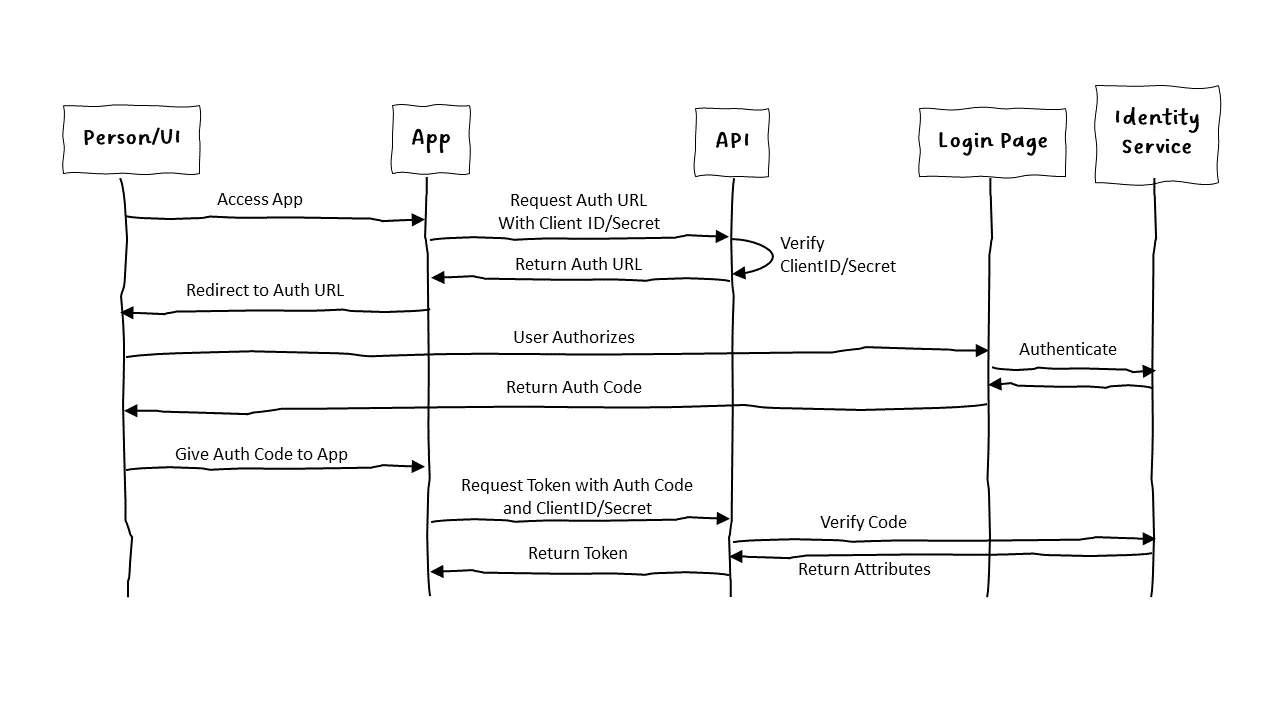
The important thing to notice here is that the API is aware of both the User attributes and the App attributes. If an App doesn't have permission to get an access token using the Authorization Grant flow, then it won't get a valid token. If the user doesn't have permission to access this API (or the parts of the API the app wants to access), the token won't have sufficient permissions.
This combination of Service Account credentials with the User Account permissions allow us to tune who gets to see what when and where and is much more flexible, and secure, than an app with god-like abilities to read and write to everything.
Your resume is your most valuable tool in your job search. But how do you know your resume is in top shape?
Our recruiters will review your resume line by line and give you detailed feedback on how you can improve it.
Visit mjlprojects.com to learn more!